Blogs
WAV vs MP3:Is WAV Better Than MP3?
Introduction
While discussing digital audio, the most asked question is: Is WAV better than MP3? The answer is simple yet contradictory: both formats are widely used and serve different purposes. WAVs are popular for their uncompressed and uncompromised sound qualities. At the same time, MP3 is praised for its compact file size and ease of use.
Choosing between these two options depends on your priorities, whether you value sound quality, storage space, or ease of file sharing. In this guide, you will find a comprehensive overview of both formats, including their differences and the conditions under which each format is suitable. Moreover, you will receive a step-by-step guide on converting WAV files to MP3 and vice versa.
What is WAV?
WAV (Waveform Audio File Format) is an audio format developed by Microsoft and IBM, which preserves audio in an uncompressed form. These files contain the raw data, exactly as it was recorded. No compression means there is nothing to compromise sound quality. However, the WAV files are large in size.
WAV is popular in the music production industry because professional recording studios and audio editing software recommend sounds in lossless quality. It indicates that a 3-minute audio file can take up to 30–50 MB, while the same audio in MP3 takes 3–5 MB. This fact highlights that WAV is suitable only if sound quality is the primary concern, such as when mixing tracks and mastering music.
What is MP3?
MP3, also known as MPEG Audio Layer III, is one of the most popular audio formats used worldwide. Compared to WAV, MP3 uses compression that reduces the file size by removing some of its audio data. Professionals use this technique to save storage space and make it easier to save and share the files. Compression doesn’t mean the sound quality is bad; the format is still greatly acceptable for everyday listening.
The biggest pros of the MP3 format are its convenience. A small audio file of a few minutes can utilise around 3 to 5 MB storage space, which is enough for mobile phones, streaming, and portable music players. However, it is said that it has reduced audio quality compared to WAV. While casual listeners may not be able to find out the difference, professionals often prefer high-quality audio only.
Differences between WAV and MP3
While looking for the difference between WAV and MP3, it depends on how you are going to use the audio. Both formats have unique properties that distinguish them. Let’s discuss different components and see how both formats react.
Audio Quality
o WAV: Uncompressed and loss-free, provides studio-quality sound that captures every bit of the original recording.
o MP3: Compressed and lossy, some frequencies of sound data are removed, resulting in a slight reduction in quality.
File Size
o WAV: Large in size, making it less suitable for casual storage or sharing.
o MP3: Much smaller file size, perfect for streaming and portable devices.
Best Use Cases
o WAV: Music professionals use these files for production, editing, archiving, and high-quality playback.
o MP3: For a seamless experience, day-to-day listening, downloading, and streaming require an MP3 format.
Compatibility
o WAV: Supported by most audio editing software, but it does not give satisfactory results for mobile storage.
o MP3: Compatible with almost all devices, apps, and platforms.
Flexibility in Editing
o WAV: Editing requires an uncompressed file or more precise results; WAV gives a sustainable experience.
o MP3: Limited editing flexibility, and multiple attempts to save can further lower the quality.
Which one is better for Audio Streaming?
If you are considering audio streaming, MP3 vs. WAV, MP3 is likely the better option. These platforms typically prefer speed, efficiency, and accessibility, which requires the files to be in a smaller size. Since MP3 files are compressed, they require less loading time, utilise low bandwidth, and minimise buffering issues, making them an optimal solution for online programs and live broadcasting.
On the other hand, WAV files offer superior audio quality, but they are significantly larger in size than MP3 files. In live streaming, WAV files require more storage space, which can ultimately slow down playback and result in a poor user experience. Especially, mobile users face lots of buffering and a poor experience. That is why streaming platforms like Spotify, Apple Music, and YouTube rely more on MP3 or other compressed formats for seamless streaming.
To conclude, for audio streaming, MP3 outperforms WAV due to its optimal balance of quality and performance. However, for high-fidelity streaming, WAV could also be used.
How to Convert WAV to MP3 or MP3 to WAV?
Converting WAV to MP3 and vice versa is a basic process. Follow the steps to convert the files in a few seconds. However, you need a reliable software application or tool to convert them into an actual frequency. AhaConvert is a software application that will help you convert audio files from almost all audio formats. Moreover, you will get 1GB free conversion with no conversion limit. The premium version comes with amazing features that work diligently to ensure the authenticity of your files. Let us discuss the three basic steps:
- Go to AhaConvert.comand find the Audio Converter
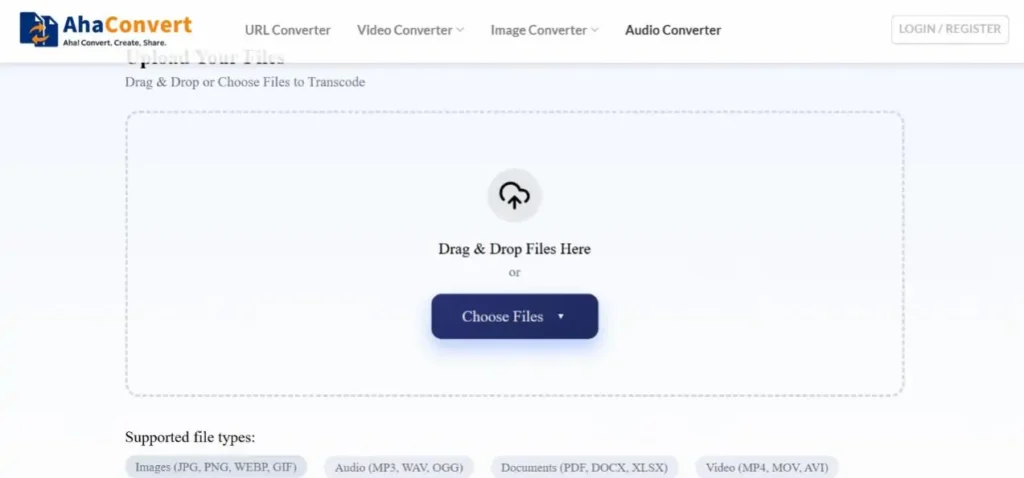
- Upload your file by selecting its file format, either WAV or MP3. Please select the file and drag it from the computer.
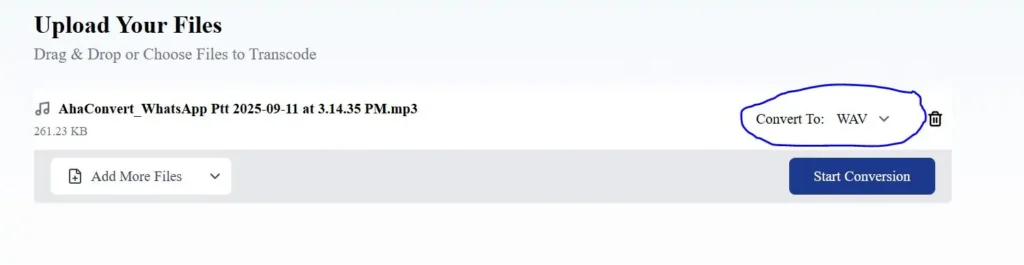
- Once the file is uploaded, choose the output format in which you want to convert the file.
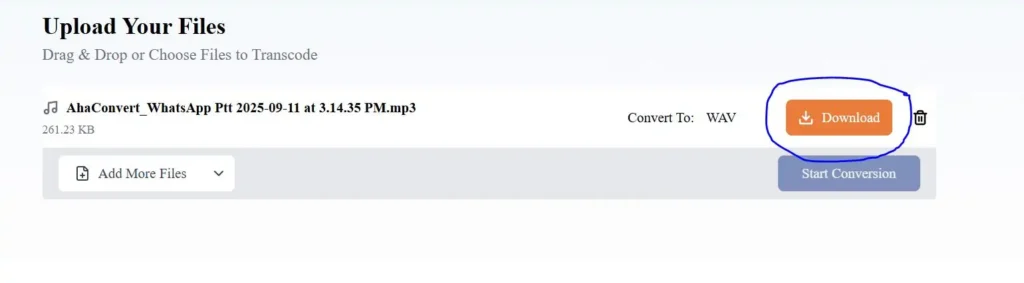
- Click the convert button and let the process finish. The speed of conversion depends on the file size and the internet speed.
- Once done, you will see a download link; click on it. The converted file will be saved on your system.
Conclusion
Is WAV better than MP3? The answer highly depends on user needs, as WAV files deliver uncompressed and original audio files, so that’s perfect for professionals and musicians. If you need audio files for editing, recording, or archiving, WAV is the best choice. At the same time, MP3 files are smaller, convenient, and an ideal option for streaming, sharing, and day-to-day activities.
If you are sure about which file format is suitable for your needs and require assistance with converting the files, you are in the right place. AhaConvert will help you convert files in just a few basic steps with a few clicks. The files will be ready for use immediately after conversion. The sound quality is highly ensured with free conversion up to 1GB. Hurry up! Get your audio files ready for streaming now.
FAQs
1. Which Sound Quality is better between MP3 and WAV?
If you are looking for top-notch sound quality, WAV is a better option than MP3. WAV files are uncompressed and lossless, meaning they contain the original recorded files without any data loss. In contrast, MP3 uses compression to reduce file size. This process slightly reduces the overall audio quality by removing some details and frequencies. These changes are so subtle that even a casual listener cannot notice them.
2. What are the Disadvantages of WAV?
WAV files are known for their high-quality sound. However, there are some drawbacks to them, making them less suitable for everyday use.
- Larger file size, which needs more storage space.
- These uncompressed files need more bandwidth, which is not ideal for streaming.
- Although all portable devices support WAV, it can quickly drain storage space. It limits the number of recordings or songs that can be carried.
- Due to their larger file size, WAV files are less convenient to share, email, or transfer over a slow internet.
3. Does Spotify Support MP3 and WAV Audio Formats?
Spotify supports both MP3 and WAV file formats for uploading audio files, such as podcasts. The platform generally accepts these file formats and processes them. However, it is essential to understand that the Spotify streaming system differs from uploading formats. It can change the files to a more efficient format to optimise the streaming. It means that if you upload the file in WAV format, Spotify may accept it and convert it to a compressed format while streaming.