Блоги
JPG проти JPEG: Чи JPG та JPEG одне й те саме?
When working with images, you have likely encountered files with the suffixes .jpg or .jpeg. On the surface, they are the same. This is why the question “JPG vs JPEG” is a standard search among users looking for the format to use. Many people wonder which offers better quality, compatibility, or performance.
This article provides clear answers to these questions. You will know what JPG and JPEG are, what the differences are, is JPG the same as JPEG, why they both use the .jpg and .jpeg extensions, and how to convert a JPEG у JPG using an online tool easily.
Що таке формат JPG?
JPG is a widely used image format. It was created to store photographic images and reduce file sizes.
JPG is a lossy compression format that reduces image file size while maintaining acceptable visual quality. This means it loses part of the image data when saving. The compression, however, is typically directed at aspects the human eye cannot easily see. Consequently, JPG files look nice and take up less space.
Due to this equilibrium, JPG has become popular for use as website images, digital photography, email attachments, and social media posts. Reduced file sizes also contribute to faster page loading, enhancing the user experience.
Що таке формат JPEG?
JPEG stands for Joint Photographic Experts Group, the organization that developed the compression standard. Technically, JPEG refers to the compression method itself, while JPG is simply a shortened file extension.
JPEG files use the same compression method as JPG files. Image data is stored in the same manner. The only difference is the file extension.
JPEGs are also lossy and are optimized towards photographs and realistic images. Like JPGs, they can display millions of colors and sharp gradients, making them ideal for photographs.
The interaction of JPEG is precisely the same as JPG in everyday activities in software, devices, and browsers.

Is JPG the Same as JPEG?
In all material senses, JPG is identical to JPEG. The two formats are compatible and have the same compression algorithm and quality settings. The confusion stems from the user’s belief that the various extensions represent different technologies.
To further clarify this, we will outline the differences and similarities.
JPG vs JPEG: Key Differences
– The major difference is the length of the file extension. JPG consists of three letters, whereas JPEG consists of four.
– This has been a difference between older Windows systems that had three-character extensions only. To avoid this constraint, the name of the file was abbreviated to JPG.
– There are those platforms that default to use .jpg, and others use .jpeg. Nonetheless, this option has no impact on the quality and performance of the image.
JPG vs JPEG: Key Similarities
– The lossy compression standard is the same in both formats. They also have the same color depth and quality controls.
– JPG and JPEG files are readable in all the current browsers, operating systems, and image editors.
– As a user, the difference between them does not manifest itself in any visible or technological benefit.
JPG vs JPEG: Why Do Both .jpg and .jpeg Exist?
Both extensions have their origins in the historical technical shortcomings. Early Microsoft Windows made file extensions to not exceed three characters.
Due to this limitation, programmers truncated the name of the file to a JPG. In the meantime, the Unix-based systems did not have such a restriction, and they were still utilizing the entire extension.
Both naming conventions came to be generally accepted as technology advanced. Nowadays, both operating systems are supported, and that is why they co-exist.
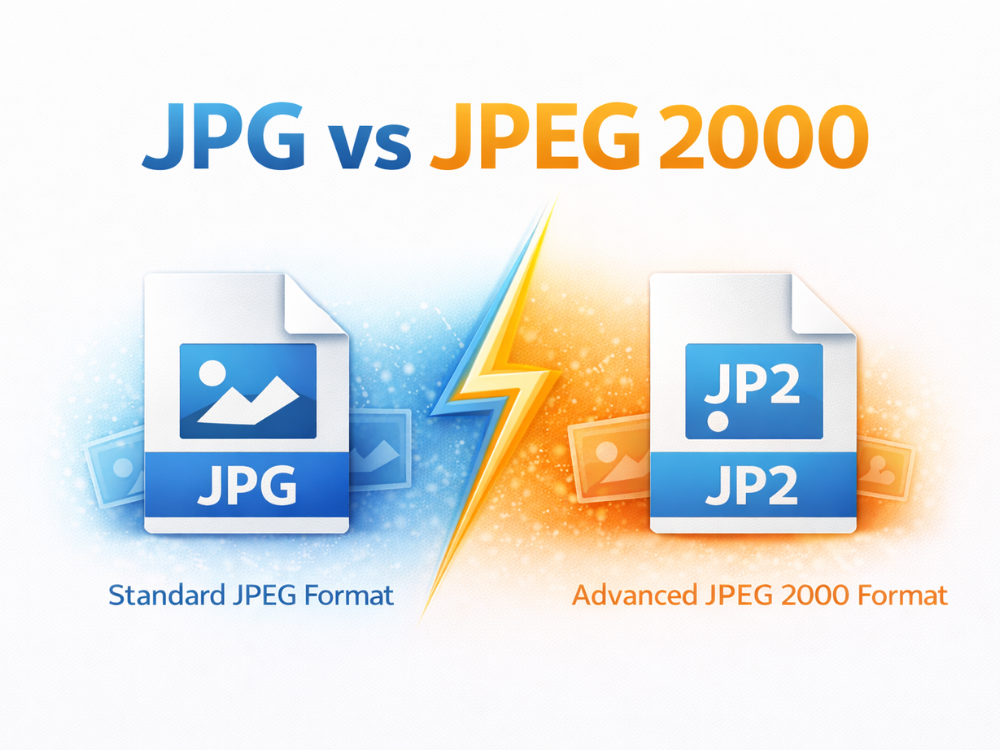
JPG vs JPEG 2000
JPEG 2000 is a different image format entirely and should not be confused with JPG or JPEG. It was designed as a more advanced compression standard.
What Is JPEG 2000?
JPEG 2000 is an image format that can be compressed using both lossy and lossless methods. It also enables graded image loading and higher compression ratios. Despite such benefits, JPEG 2000 did not receive widespread adoption. It cannot be used as a replacement for JPG due to limited browser support and low performance.
Key Differences Between JPG and JPEG 2000
| Функція | JPG / JPEG | JPEG 2000 |
|---|---|---|
| Стиснення | Lossy only | Lossy and lossless |
| File extension | .jpg / .jpeg | .jp2 |
| Browser support | Universal | Limited |
| Common use | Web images, photos | Archiving, specialized fields. For most users, JPG and JPEG are the superior choice because of compatibility. |
Which One Should You Use? JPG vs JPEG
When comparing the JPG and JPEG formats, the biggest question is which is best. In practice, this option does not affect image quality, performance, or compatibility. Nevertheless, it may still be helpful to know where each format is typically applied.
As a result, JPG and JPEG behave the same way in most modern systems. Both extensions are treated similarly by the websites, browsers, content management systems, and social media platforms. The same effect is created by uploading a .jpg or a .jpeg file.
With that said, there are preference platforms. Most websites and web forms are set to .jpg simply because it was the traditional format, and it’s always been that way. Digital cameras or systems running macOS, on the other hand, typically default to JPG image files.
When setting up a site or posting images online, JPG is generally the safest format. It does not encounter the problem of rare upload limits where one site accepts .jpg but not .jpeg. Both formats are suitable for personal storage or editing.
In summary, a yes-or-no question yields the same answer: whether ask is the same as JPG and JPEG. Either presentation style can be used with ease, with no technical drawbacks.
How to Change Image Format from JPEG to JPG?
Since JPG and JPEG use the same internal format, there is no loss of image quality when converting between them. The process primarily involves changing the file extension.
Here’s a simple step-by-step guide on how to convert JPEG to JPG using AhaConvert, a convenient browser-based file conversion tool.
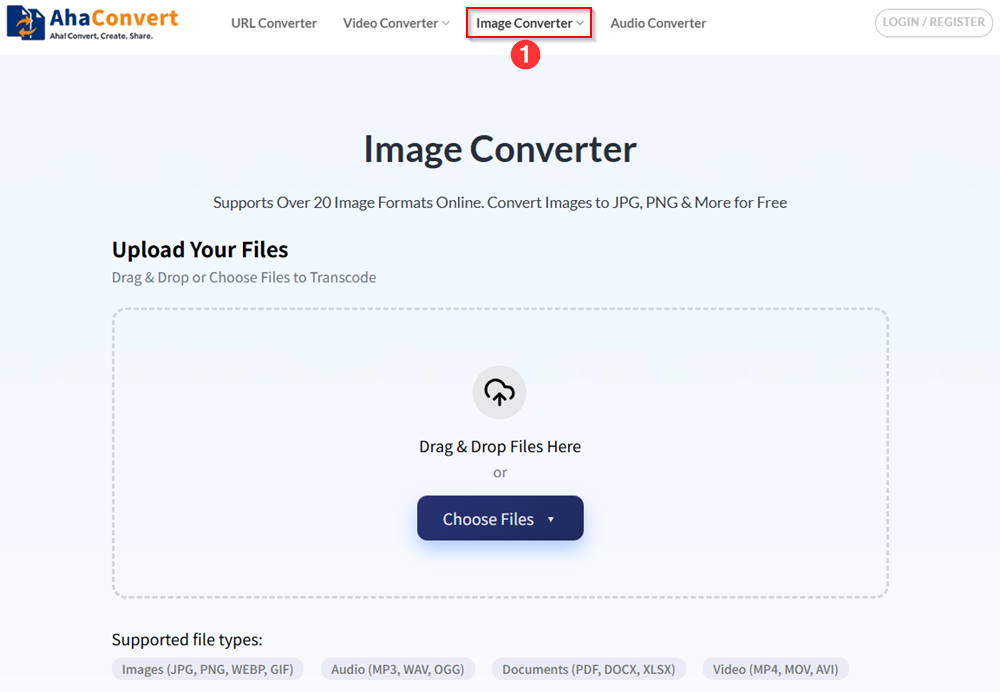
Step 1: Open the AhaConvert JPG Converter
Перейдіть до AhaConvert website and navigate to the “Конвертер зображень“.
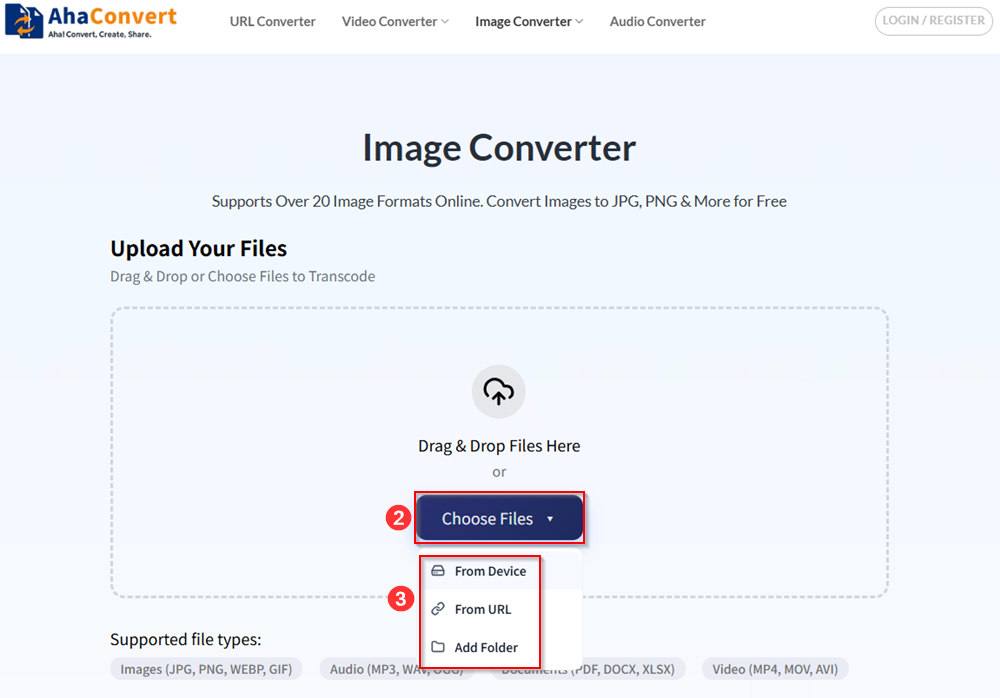
Step 2: Upload Your JPEG File
Simply drag and drop your files to upload them, or click “Choose Files” to upload your files. You can select your files from local devices or an online URL. AhaConvert also allows you to batch-upload your files by adding a folder.
Step 3: Select JPG as the Output Format
Make sure that you choose JPG as a target format.
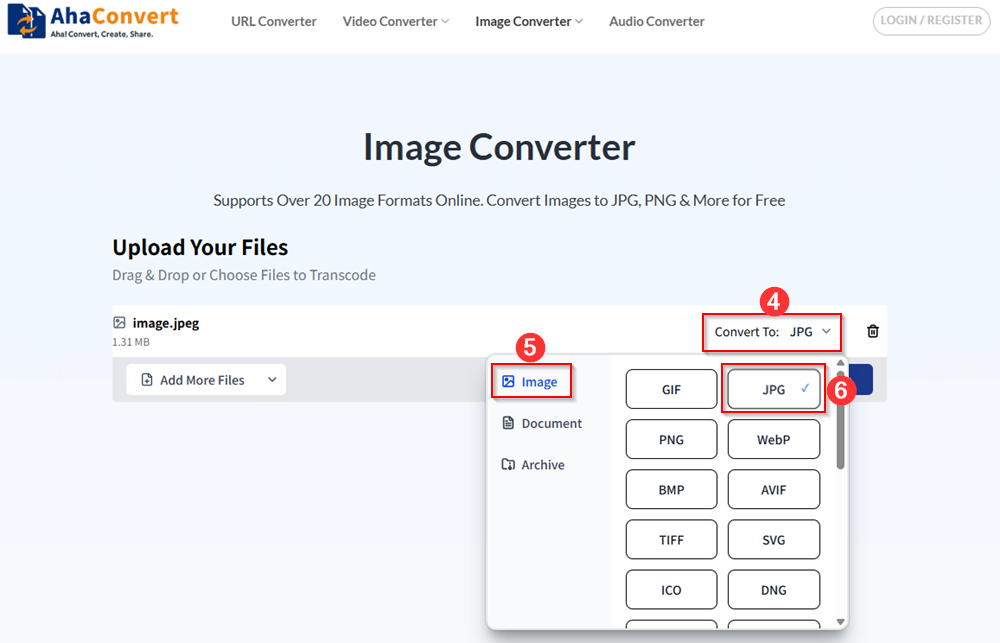
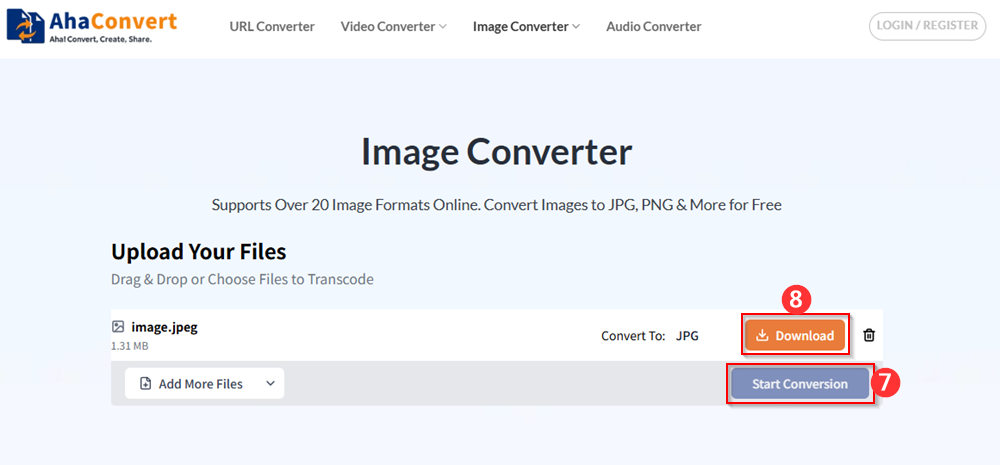
Step 4: Convert and Download
Initiate the conversion process by clicking “Start Conversion”. After a few seconds, the output JPG file can be downloaded when the process finishes. AhaConvert requires no installation and works on both desktop and mobile devices.
Common Myths About JPG vs JPEG
The JPG and JPEG have several myths that might mislead novices. These myths are much easier to clear up, and we can proceed with working with images.
A widely held myth is that JPEG has superior quality to JPG. This is not real or true. Both formats can be compressed using the same standard, and they will produce identical output with the same quality settings.
Another myth is that JPG files load faster than JPEG files. File loading speed is not dependent on file extension. An image with the same compression, regardless of whether it is a JPG or a JPEG, will load equally.
Other users also believe they must always encode JPEGs as JPGs to use them on websites. In fact, most current websites use both formats without issue. Only when a specific platform strictly limits file extensions will conversion be required.
It is also a myth that converting an image to JPEG or JPG corrupts the image. The two formats are both internally compatible, and renaming normally should not be a problem, but it is safer to use a converter
Tips on Preventing the Loss of Quality with JPEG to JPG Conversion
Users are often concerned about image quality when converting JPEG to JPG. Fortunately, quality loss does not occur during the conversion process.
Since JPG and JPEG use the same internal format, converting between them does not recompress the image. Consequently, there is no change in the visual appearance.
However, quality can be diminished by repetitive image editing and saving. To prevent this, store your original image as well and avoid saving it too many times.
Using a reliable online tool such as AhaConvert will also ensure the file is managed properly. Such tools do not ruin images and do not add additional compression steps.
Why are There Websites that Accept JPG But Not JPEG?
Other websites authenticate uploads using file extensions rather than file structure. Otherwise, a website can support .jpg files but not .jpeg files. The problem can be resolved immediately by converting the file or by renaming it.
Frequently Asked Questions About JPG and JPEG
1. Is JPG Lossy or Lossless?
JPG is a lossy format, meaning it compresses images by discarding some data to reduce file size. This process helps make the images smaller, which is ideal for web use, but it can lead to a slight loss in quality.
2. Is JPG or JPEG Better for Web Use?
No, there’s no real difference between JPG and JPEG for web use. Both formats use the same compression method, so they have identical quality, file size, and performance. The choice between JPG and JPEG is typically based on personal preference or platform requirements rather than any technical advantages.
3. Are JPG and JPEG Supported By All Devices and Software?
Yes, both JPG and JPEG are universally supported across almost all devices, operating systems, and software. Whether you’re using Windows, macOS, or a mobile device, you can easily view and edit JPG or JPEG images without any issues.
4. Does Converting JPEG to JPG Reduce Image Quality?
No, converting JPEG to JPG does not reduce image quality. Both formats are the same in terms of compression and image data. The only difference is the file extension. Since JPEG and JPG use the exact same compression method, the conversion process only changes the file name and does not affect the image itself.
5. Why are the Pictures Indicated As Images in JPEG Rather than JPG?
The majority of digital cameras abide by the official name of the format, the JPEG. Extended storage systems are now allowed by storage systems, which is the reason why manufacturers are defaulting to use .jpeg without restrictions.
6. Is It Possible to Change the JPEG to JPG Without Conversion?
Yes, it is possible to change JPEG to JPG simply by renaming the file extension. Since both formats use the same compression method and file structure, you can rename the file from “image.jpeg” to “image.jpg” without affecting the image quality.
Wrapping Up
When comparing JPG vs JPEG, the answer is clear: they’re essentially the same format with different file extensions. It is good to understand this so that you will be able to save, share, and convert images with confidence. Whether you save it in JPG or in JPEG, the result will be the same, whether you see it on any device or platform or not. Whether you save your images as JPG or JPEG doesn’t matter—they will look the same and perform equally well.
If you need to convert between the two formats, tools like AhaConvert make the process simple and quick. No need to worry about quality loss—just choose the format that works best for your platform!