部落格
JPG 與 JPEG:JPG 和 JPEG 是一樣的嗎?
When working with images, you have likely encountered files with the suffixes .jpg or .jpeg. On the surface, they are the same. This is why the question “JPG vs JPEG” is a standard search among users looking for the format to use. Many people wonder which offers better quality, compatibility, or performance.
本文將清楚解答這些問題。您將了解 JPG 和 JPEG 分別是什麼,它們之間有什麼區別,JPG 和 JPEG 是否相同,為什麼它們都使用 .jpg 和 .jpeg 副檔名,以及如何轉換 JPG 和 JPEG 格式的圖片。 JPEG 轉 JPG 輕鬆使用線上工具。
什麼是JPG格式?
JPG是一種廣泛使用的影像格式。它的創建是為了儲存照片圖像並減小檔案大小。
JPG 是一種有損壓縮格式,它能在保持可接受的視覺品質的同時減少影像檔案大小。這意味著它在保存時會丟失部分影像資料。然而,這種壓縮通常針對的是人眼不易察覺的部分。因此,JPG 檔案看起來美觀且佔用空間更小。
由於這種平衡,JPG格式已成為網站圖片、數位照片、電子郵件附件和社交媒體貼文的熱門選擇。文件大小的減少也有助於加快頁面載入速度,進而提升使用者體驗。
什麼是JPEG格式?
JPEG是聯合影像專家小組(Joint Photographic Experts Group)的縮寫,該組織制定了這種壓縮標準。嚴格來說,JPEG指的是壓縮方法本身,而JPG只是一個縮短的檔案副檔名。
JPEG 檔案和 JPG 檔案使用相同的壓縮方法,影像資料的儲存方式也相同,唯一的區別在於檔案副檔名。
JPEG格式也是有損壓縮格式,並且針對照片和逼真影像進行了最佳化。與JPG格式一樣,JPEG可以顯示數百萬種顏色和清晰的漸變,使其成為照片的理想選擇。
在軟體、裝置和瀏覽器等日常活動中,JPEG 的互動方式與 JPG 完全相同。

JPG 和 JPEG 是一樣的嗎?
In all material senses, JPG is identical to JPEG. The two formats are compatible and have the same compression algorithm and quality settings. The confusion stems from the user’s belief that the various extensions represent different technologies.
為了進一步闡明這一點,我們將概述它們之間的異同。
JPG 與 JPEG:主要區別
– The major difference is the length of the file extension. JPG consists of three letters, whereas JPEG consists of four.
– This has been a difference between older Windows systems that had three-character extensions only. To avoid this constraint, the name of the file was abbreviated to JPG.
– There are those platforms that default to use .jpg, and others use .jpeg. Nonetheless, this option has no impact on the quality and performance of the image.
JPG 與 JPEG:主要相似之處
– The lossy compression standard is the same in both formats. They also have the same color depth and quality controls.
– JPG and JPEG files are readable in all the current browsers, operating systems, and image editors.
– As a user, the difference between them does not manifest itself in any visible or technological benefit.
JPG 與 JPEG:為什麼同時存在 .jpg 和 .jpeg 格式?
這兩種擴展名都源自於歷史上的技術缺陷。早期的微軟Windows系統限製檔案副檔名不能超過三個字元。
由於這項限制,程式設計師將檔案名稱截斷為 JPG。同時,基於 Unix 的系統沒有這種限制,它們仍然使用完整的擴展名。
隨著技術進步,這兩種命名規則都被普遍接受。如今,兩種作業系統都得到支持,因此它們能夠共存。
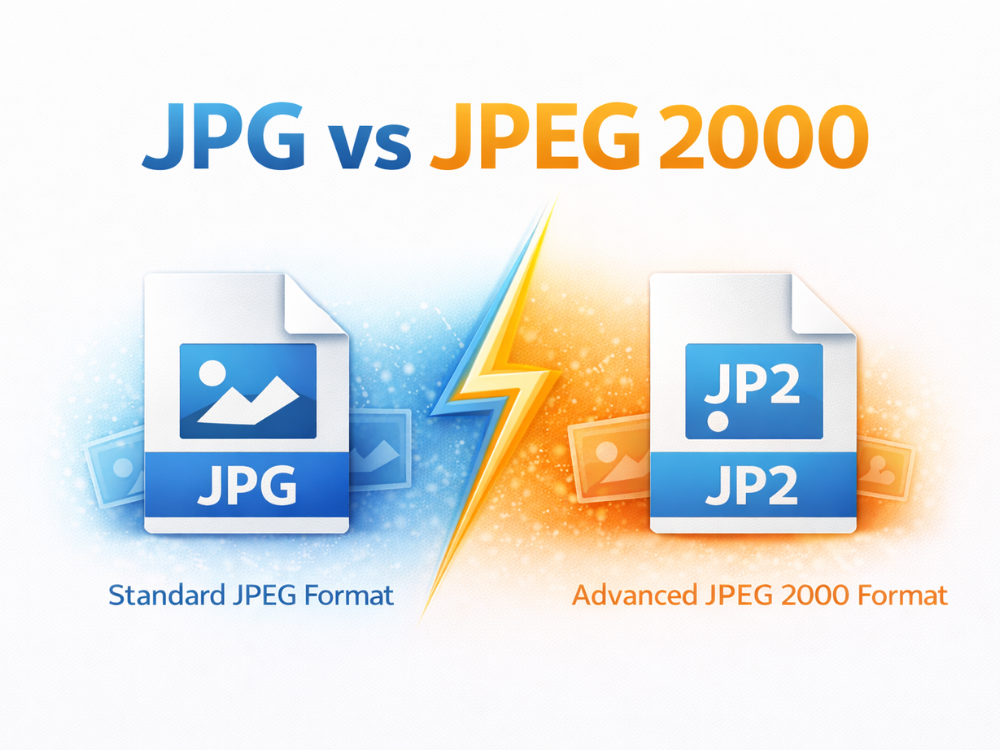
JPG 與 JPEG 2000
JPEG 2000 是一種完全不同的影像格式,不應與 JPG 或 JPEG 混淆。它被設計為一種更先進的壓縮標準。
什麼是JPEG 2000?
JPEG 2000 是一種影像格式,它既可以使用有損壓縮,也可以使用無損壓縮。它還支援漸變加載和更高的壓縮比。儘管有這些優點,JPEG 2000 並未廣泛應用。由於瀏覽器支援有限且效能較低,因此它無法取代 JPG 格式。
JPG 和 JPEG 2000 的主要區別
| 特徵 | JPG / JPEG | JPEG 2000 |
|---|---|---|
| 壓縮 | 僅有損 | 有損和無損 |
| 檔案副檔名 | .jpg / .jpeg | .jp2 |
| 瀏覽器支援 | 普遍的 | 有限的 |
| 常用 | 網路圖片、照片 | 歸檔,專業領域。對於大多數用戶而言,JPG 和 JPEG 格式由於相容性好,是更佳選擇。 |
應該使用哪種格式? JPG 還是 JPEG?
比較 JPG 和 JPEG 格式時,最大的問題是哪種格式比較好。實際上,這種選擇不會影響影像品質、效能或相容性。儘管如此,了解每種格式的典型應用場景仍然很有幫助。
因此,在大多數現代系統中,JPG 和 JPEG 的行為方式相同。網站、瀏覽器、內容管理系統和社群媒體平台對這兩種副檔名的處理方式也類似。上傳 .jpg 檔案或 .jpeg 檔案都會產生相同的效果。
With that said, there are preference platforms. Most websites and web forms are set to .jpg simply because it was the traditional format, and it’s always been that way. Digital cameras or systems running macOS, on the other hand, typically default to JPG image files.
在建立網站或線上發布圖片時,JPG 通常是最安全的格式。它不會遇到某些網站只接受 .jpg 格式而不接受 .jpeg 格式的上傳限制問題。兩種格式都適合個人儲存或編輯。
總之,是非題的答案相同:詢問是否正確與詢問 JPG 和 JPEG 格式相同。兩種格式都可以輕鬆使用,沒有任何技術缺陷。
如何將影像格式從JPEG改為JPG?
由於 JPG 和 JPEG 使用相同的內部格式,因此在兩者之間轉換不會造成影像品質損失。轉換過程主要涉及更改檔案副檔名。
Here’s a simple step-by-step guide on how to convert JPEG to JPG using AhaConvert, a convenient browser-based file conversion tool.
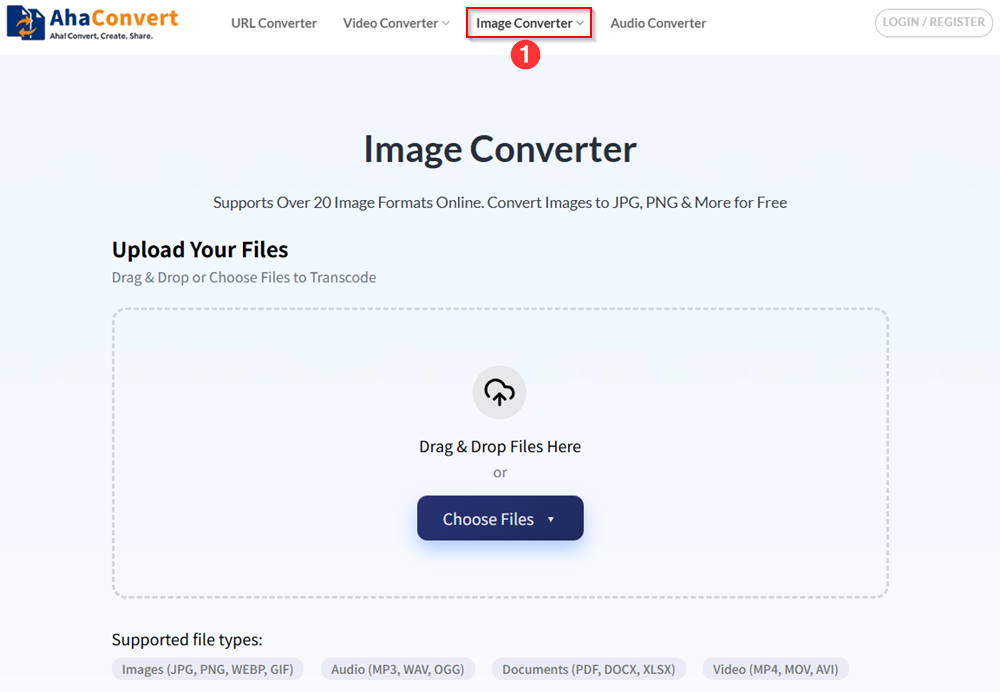
步驟 1:開啟 AhaConvert JPG 轉換器
前往 AhaConvert website and navigate to the “影像轉換器“.
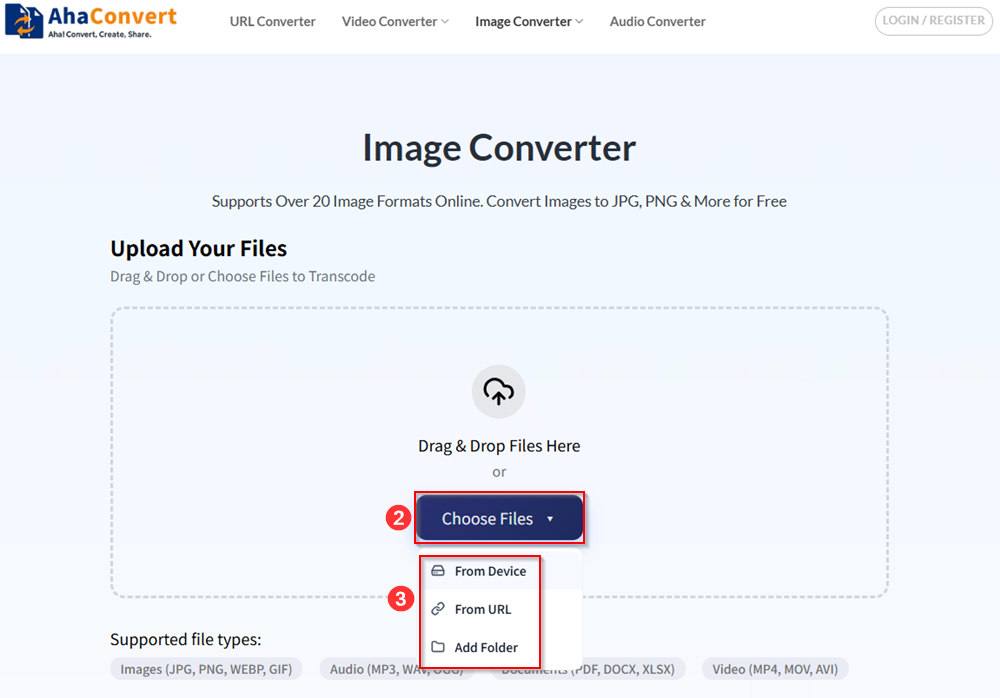
步驟二:上傳您的 JPEG 文件
Simply drag and drop your files to upload them, or click “Choose Files” to upload your files. You can select your files from local devices or an online URL. AhaConvert also allows you to batch-upload your files by adding a folder.
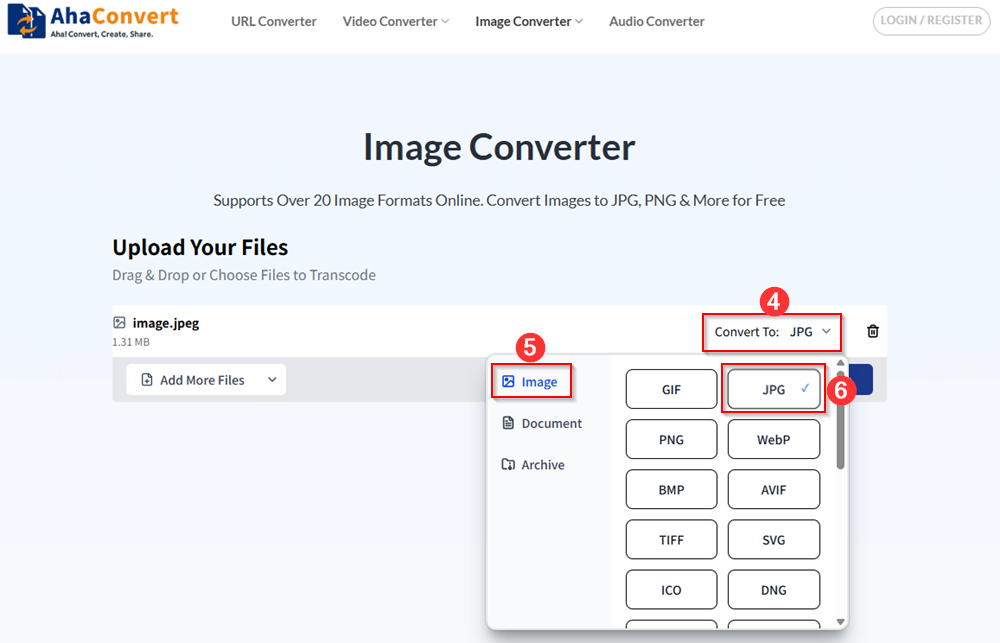
步驟 3:選擇 JPG 作為輸出格式
請務必選擇 JPG 作為目標格式。
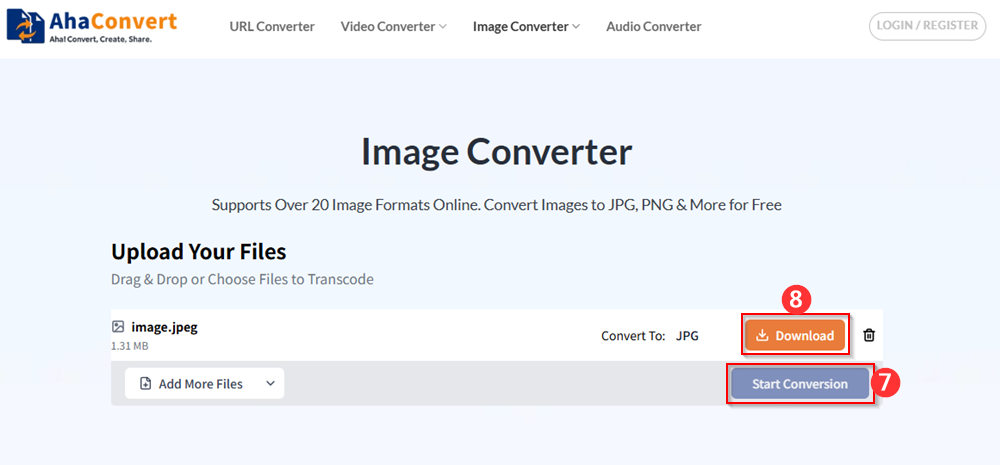
步驟 4:轉換並下載
Initiate the conversion process by clicking “Start Conversion”. After a few seconds, the output JPG file can be downloaded when the process finishes. AhaConvert requires no installation and works on both desktop and mobile devices.
關於 JPG 和 JPEG 的常見誤解
JPG 和 JPEG 格式存在一些容易誤導新手的誤解。這些誤解很容易澄清,澄清之後我們就可以繼續進行影像處理了。
很多人誤以為JPEG比JPG畫質好,但這並非事實。兩種格式都可以使用相同的壓縮標準,在相同的畫質設定下,它們會產生完全相同的輸出結果。
另一個誤解是 JPG 檔案比 JPEG 檔案載入速度更快。檔案載入速度與檔案副檔名無關。壓縮率相同的影像,無論是 JPG 還是 JPEG,載入速度都一樣。
其他用戶也認為必須將 JPEG 圖片編碼為 JPG 才能在網站上使用。事實上,目前大多數網站都同時支援這兩種格式,沒有任何問題。只有當特定平台嚴格限製檔案副檔名時,才需要進行格式轉換。
將影像轉換為 JPEG 或 JPG 格式會損壞影像也是個誤解。這兩種格式內部相容,通常重新命名不會有問題,但使用轉換器更安全。
如何防止 JPEG 轉 JPG 轉換過程中出現品質損失
使用者在將JPEG轉換為JPG時,常常擔心影像品質。幸運的是,轉換過程中不會出現品質損失。
由於 JPG 和 JPEG 使用相同的內部格式,因此在它們之間轉換不會重新壓縮影像。因此,影像的視覺效果不會改變。
然而,重複編輯和保存影像會降低影像品質。為避免這種情況,請同時儲存原始影像,並避免多次儲存。
使用像 AhaConvert 這樣可靠的線上工具也能確保文件得到妥善處理。這類工具不會損壞影像,也不會增加額外的壓縮步驟。
為什麼有些網站接受 JPG 格式而不接受 JPEG 格式?
其他網站則使用檔案副檔名而非檔案結構來驗證上傳檔案。例如,一個網站可能支援 .jpg 文件,但不支援 .jpeg 文件。這個問題可以透過轉換檔案格式或重新命名檔案來立即解決。
關於 JPG 和 JPEG 的常見問題
1. JPG 是有損格式還是無損格式?
JPG 是一種有損壓縮格式,這意味著它會透過丟棄部分資料來壓縮影像,從而減少檔案大小。這個過程有助於縮小影像尺寸,非常適合網路使用,但可能會導致輕微的影像品質損失。
2. JPG 和 JPEG 哪個比較適合網頁使用?
No, there’s no real difference between JPG and JPEG for web use. Both formats use the same compression method, so they have identical quality, file size, and performance. The choice between JPG and JPEG is typically based on personal preference or platform requirements rather than any technical advantages.
3. 所有裝置和軟體都支援 JPG 和 JPEG 格式嗎?
Yes, both JPG and JPEG are universally supported across almost all devices, operating systems, and software. Whether you’re using Windows, macOS, or a mobile device, you can easily view and edit JPG or JPEG images without any issues.
4. 將 JPEG 轉換為 JPG 會降低影像品質嗎?
不,將JPEG轉換為JPG不會降低影像品質。這兩種格式在壓縮和圖像資料方面完全相同,唯一的區別在於檔案副檔名。由於JPEG和JPG使用完全相同的壓縮方法,轉換過程只會更改檔案名,而不會影響影像本身。
5. 為什麼圖片格式顯示為 JPEG 而不是 JPG?
大多數數位相機都採用JPEG格式,這是該格式的正式名稱。儲存系統現在允許使用擴充儲存系統,這也是製造商預設使用.jpeg格式而不受限制的原因。
6. 是否可以在不轉換的情況下將 JPEG 更改為 JPG?
Yes, it is possible to change JPEG to JPG simply by renaming the file extension. Since both formats use the same compression method and file structure, you can rename the file from “image.jpeg” to “image.jpg” without affecting the image quality.
總結
When comparing JPG vs JPEG, the answer is clear: they’re essentially the same format with different file extensions. It is good to understand this so that you will be able to save, share, and convert images with confidence. Whether you save it in JPG or in JPEG, the result will be the same, whether you see it on any device or platform or not. Whether you save your images as JPG or JPEG doesn’t matter—they will look the same and perform equally well.
如果您需要在兩種格式之間進行轉換,可以使用以下工具: AhaConvert 讓流程簡單快速。無需擔心品質損失——只需選擇最適合您平台的格式即可!